Reading and Doing

As I wrap up my time here at JobServe, I thought it might be helpful to put together a short list of books, videos, tools and blogs, that I have found useful in my own personal journey into the world of Agile development.

There are lots of omissions for which I apologise, these are just the ones that have stuck with me They are in no specific order and the presence or absence of any specific book, video, tool or blog denotes nothing other than the deficiencies of my memory.

So it’s a place to start, not an end.

Books

Clean Code – Robert C Martin

Refactoring – Martin Fowler

Domain Driven Design – Eric Evans

The Pragmatic Programmer – Andrew Hunt and Dave Thomas

The RSpec Book – David Chelimsky, Dave Astels, Zach Dennis, Askak Hellesoy, Bryan Helkamp and Dan North

Practices of an Agile Developer – Venkat Subramaniam and Andy Hunt

Agile in a Flash – Jeff Langr and Tim Ottinger


Videos

Craftsmanship and Ethics – Robert C. Martin

Bad Code Craftsmanship Engineering & Certification – Robert C. Martin

Behaviour Driven Development – Dan North

Coding in Public – Alan Stevens

Domain Driven Design and Domain specific Languages – Eric Evans

Software Craftsmanship Beyond the Hype – Cory Haines


Tooling

Resharper 

Enso – Program launcher with a universal spell checker

Pomodoro Technique and Pomodoro Timer – time management tool

Espresso – Regex workbench with an easy to use interface

LinqPad – runs sql and linq expressions

XMarks – sync your bookmarks across computers

Evernote – sync note taking across computers, I use this to store web pages for later reading

Dropbox – sync files across computers

Twhirl –  social network feed


Blogs

Antony Marcano

J.B. Rainsberger

Corey Haines

Object Mentor

Kent Beck

Gojko Adzic

CodeBetter.com

Michael Feathers

Hopefully this is a useful list.

Posted in Uncategorized | Leave a comment

Always Re-write!

Dan North has come up with an interesting idea he presented during a recent talk at InfoQ.  Just to recap the premise. 

When we start a new project we know very little about the actual solution, some design will have been done, collection of features to implement etc. But the actual code we will write is as yet unknown.

The initial version is quick to develop and contains the best code we could write at the time, with the knowledge we had, but over time as we add features the application its structure begins to degrade and change becomes difficult

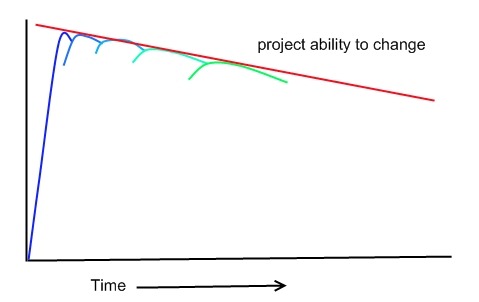
Project Decay

So eventually even the most well designed and developed application will have to be rewritten from scratch, this decay is well known within software design, called “Technical Debt” it describes the decay of code as features are added, by paying down this debt we can extend the life of a project, but according to this premise the application will have to be rewritten at some point in the future, when adding a feature becomes too expensive.

Hindsight is a wonderful thing, how many times have you finished an application and thought if I was to start this again I do do ‘x’ or use framework ‘y’.

When we finish the application, we have actually learnt how to do it, and probably have a whole host of ideas on how to do it better, if only there was a next time!

So what if every time a new feature is added, the application is rewritten from scratch!

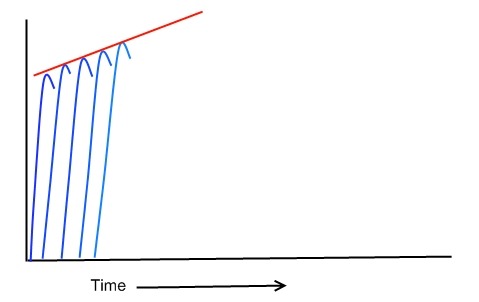
Program Rewrites

Because with every rewrite we are learning to write the application better, the productivity improves and the structure of the application improves, we write better code and because each new feature is a rewrite, the application can essentially live forever, with no technical debt.

Enough of the utopia, we can’t rewrite an Amazon or Google from the ground up every time we want to add a feature, even if the next version would be better, no business can stand that sort of development, but I do think there is something here which could improve the development process.

This is all conjecture, but I thinking along these lines:

Version one of the application will be written including of cause all the usual features and specifications.

Version two uses the features and specifications from version one, and the knowledge gained  to create a new ground up rewrite.  I think at this point the beginnings of an application specific framework will begin to develop, because we will be learning form each version the knowledge can be pushed into this framework, this framework over time is the bit that is shaped by the knowledge gained in each future version, it may not be rewritten from the ground up, but because its application specific it can be easily moulded into the best solution known at that point in time.

Version three rewrite uses the features from version one and two, and includes the framework developed from version two, this micro framework unlike other frameworks is not written in stone, because we are rewriting the application each time, it allows us to shape the framework using the latest knowledge

Using this sort of aggressive rewriting and refactoring, the actual time taken to do a rewrite should decrease as the quality of the code within the application increases.  The micro application framework should also be able to absorb new features without huge adjustment as the versions increase, the aggressive refactoring and rewriting should have created a structure that is the best for this specific application. The micro framework becomes the resource for the knowledge gained through each iteration.

Posted in Programming | Tagged , | Leave a comment

Spec Flow and Friends 4

Machine Specifications has a structure that follows the Arrange Act Assert work flow using ‘establish’, ‘because’ and one or more ‘it’ methods.  That’s great if what you are trying to specify falls neatly into the AAA pattern but what happens when you want to test a method, but give it lots of different parameters values like in the Calculator kata?

You have a few options, you could stick to the pattern, and create a new class for each new set of parameter values

  1. [Subject("Calculator Add")]
  2. public class Calling_add_with_an_empty_string
  3. {
  4.     Establish context =
  5.         () =>
  6.             {
  7.                 _calculator = new Calculator();
  8.             };
  9.  
  10.     Because of =
  11.         () =>
  12.             {
  13.                 _results = _calculator.Add("");
  14.             };
  15.  
  16.     It returns_zero =
  17.         () => _results.ShouldEqual(0);
  18.  
  19.     static int _results;
  20.     static Calculator _calculator;
  21. }
  22.  
  23. [Subject("Calculator Add")]
  24. public class Calling_add_with_one
  25. {
  26.     Establish context =
  27.         () =>
  28.             {
  29.                 _calculator = new Calculator();
  30.             };
  31.  
  32.     Because of =
  33.         () =>
  34.             {
  35.                 _results = _calculator.Add("1");
  36.             };
  37.  
  38.     It returns_one =
  39.         () => _results.ShouldEqual(1);
  40.  
  41.     static int _results;
  42.     static Calculator _calculator;
  43. }


This is very long, doesn’t for me read very well and the tests are almost the same, so I end up with a lot of duplicated code. 

The way I like to approach problems like this is to attempt to keep the sprit of the Arrange Act Assert format ensuring I keep the assert methods to a single line, but also allow the Assert to behave like the act via a well named method that encompasses the behaviour that would normally be in the act.

  1. [Subject("Calculator Add")]
  2. public class Calling_add_with
  3. {
  4.     Establish context =
  5.         () => { _calculator = new Calculator(); };
  6.  
  7.     It an_empty_string_returns_0 =
  8.         () => Add("").ShouldEqual(0);
  9.  
  10.     It a_string_containing_one_returns_1 =
  11.         () => Add("1").ShouldEqual(1);
  12.  
  13.     static int Add(string inputString)
  14.     {
  15.         return _calculator.Add(inputString);
  16.     }
  17.  
  18.     static Calculator _calculator;
  19. }

Now the tests are short, very important for maintaining understanding, and contain very little duplicated code, I use this pattern whenever I start to get tests that are very similar but span many specification classes.

With the increasing use of  ORM (Object Relational Mapping) frameworks, Linq to Sql, and the the wish to flatten architectures so that controllers may now get data directly from the database, something I am still not entirely sure about, testing code that reads or writes to a data store has become more difficult.  trying to stub out connections or commands of a data store can take longer and be more complex than the rest of the production code combined!

In these cases it can be better to just let the code access the database (a test version please) and simply tidy up after the test has completed.  But in the format of Arrange, Act, Assert, there is no cleanup phrase.  Machine specifications does have an extra tag that can be used, ‘Cleanup’ is called after all the asserts within the class have been executed.

  1. [Subject("Database Access")]
  2. public class Add_person_to_database
  3. {
  4.     Establish context =
  5.         () =>
  6.             {
  7.                 _personRepository = new PersonRepository();
  8.                 _person = new Person
  9.                               {
  10.                                   FirstName = "Duncan",
  11.                                   LastName = "Butler"
  12.                               };
  13.             };
  14.  
  15.     Because of =
  16.         () =>
  17.             {
  18.                 _personRepository.Store(_person);
  19.             };
  20.  
  21.     It stored_person_should_have_an_id =
  22.         () => _person.Id.ShouldNotBeNull();
  23.  
  24.     It should_be_able_to_retrieve_person_from_database =
  25.         () => _personRepository.Get(_person.Id).ShouldEqual(_person);
  26.  
  27.     Cleanup after =
  28.         () =>
  29.             {
  30.                 using (var dc = new PersonDataContext(""))
  31.                 {
  32.                     dc.Persons.DeleteOnSubmit(_person);
  33.                     dc.SubmitChanges();
  34.                 }
  35.             };
  36.  
  37.     static PersonRepository _personRepository;
  38.     static Person _person;
  39. }


Although I personally would prefer to avoid using the cleanup method, and I don’t like my unit tests actually hitting the database, these days with the advent of Linq it has becoming difficult to justify always having a repository class simply to make testing easier, so being able to establish some data in a database during the setup, and cleaning it up after the specification has run can be very useful.

I don’t always test the happy  path, sometimes I may want to catch an exception and check that it is of the correct type or contains the correct message, most test frameworks have a way of catching any exceptions thrown, and Machine Specifications is no different.

  1. [Subject("Calculator Add")]
  2. public class giving_calculator_add_invlid_input
  3. {
  4.     Establish context =
  5.         () =>
  6.             {
  7.                 _calculator = new Calculator();
  8.             };
  9.  
  10.     It a_string_containing_a_negative_number_throws_argument_exception =
  11.         () => Catch.Exception(() => Add("-1")).ShouldBeOfType<ArgumentException>();
  12.  
  13.     It a_stirng_containing_a_negative_number_throws_exception_with_message_containing_number =
  14.         () => Catch.Exception(() => Add("-1")).Message.ShouldContain("-1");    
  15.  
  16.     static int Add(string inputString)
  17.     {
  18.         return _calculator.Add(inputString);
  19.     }
  20.     
  21.     static Calculator _calculator;
  22. }


The syntax is a little bit funky but all Catch.Exception does is simply call the method pointed to by () => and catches any exception, this exception is simply returned, or if no exception is thrown it returns null.

Finally when I am looking at tests, most of the time I don’t actually care about the setup, or the cleanup, I care about what is being called, and the results expected from that call, so most of the time I like to push the setup and cleanup code into its own class that my test class can then inherit, never be tempted to push the act (because) method down into a base class, because when reading the tests it is important to know what was called.

  1. [Subject("Database Access")]
  2. public class Add_person_to_database : PersonRepositoryContext
  3. {
  4.     Because of =
  5.         () =>
  6.             {
  7.                 _personRepository.Store(_person);
  8.             };
  9.  
  10.     It stored_person_should_have_an_id =
  11.         () => _person.Id.ShouldNotBeNull();
  12.  
  13.     It should_be_able_to_retrieve_person_from_database =
  14.         () => _personRepository.Get(_person.Id).ShouldEqual(_person);
  15. }
  16.  
  17. public class PersonRepositoryContext
  18. {
  19.     Establish context =
  20.         () =>
  21.             {
  22.                 _personRepository = new PersonRepository();
  23.                 _person = new Person
  24.                               {
  25.                                   FirstName = "Duncan",
  26.                                   LastName = "Butler"
  27.                               };
  28.             };
  29.  
  30.     Cleanup after =
  31.         () =>
  32.             {
  33.                 using (var dc = new PersonDataContext(""))
  34.                 {
  35.                     dc.Persons.DeleteOnSubmit(_person);
  36.                     dc.SubmitChanges();
  37.                 }
  38.             };
  39.  
  40.     protected static PersonRepository _personRepository;
  41.     protected static Person _person;
  42. }


This keeps the test classes clean, the context can be shared across many test classes, it is also possible to stack the establish context methods, the parent is called before the child etc, so we are able to override properties within a specification.

  1. [Subject("Database Access")]
  2. public class Add_person_to_database : PersonRepositoryContext
  3. {
  4.     Establish context =
  5.         () =>
  6.             {
  7.                 _person.FirstName = "John";
  8.                 _person.LastName = "Smith";
  9.             };
  10.  
  11.     Because of =
  12.         () =>
  13.             {
  14.                 _personRepository.Store(_person);
  15.             };
  16.  
  17.     It stored_person_should_have_an_id =
  18.         () => _person.Id.ShouldNotBeNull();
  19.  
  20.     It should_be_able_to_retrieve_person_from_database =
  21.         () => _personRepository.Get(_person.Id).ShouldEqual(_person);
  22. }


In this way a class that has many methods can be tested whilst keeping the test code DRY and easy to maintain.

That just about covers the basics of SpecFlow and Machine Specifications and how using BDD I combine them to get the best coverage with the minimum of fragility.

Using the two products together, I am able to define what done looks like  at the start of a project, use these definitions to drive the code, dropping down to specifications where finer detail of a class or individual method is required and at the end of a project I have features written as plain text that describe the system at a high level and specifications that describe the functionality at a low level.

I recommend that people interested in learning this style of software development read the “RSpec Book” although it is written around the Ruby Language, as its forward, written by Robert C. Martin states, its not actually about Ruby, that just happens to be the language used for the examples, in the same way as I tend to use C#, what the book is actually about is writing software using best practices, to achieve reliable, maintainable and cost effective code.

Posted in Uncategorized | Leave a comment

Spec Flow and Friends 3

Following on from my last post I now have a nice failing scenario in Spec Flow

image

I could just rush in and start writing production code to make the scenario pass, but this would be a mistake, scenarios by their nature tend to be at a higher level covering a flow of work through the whole system, so I will probably have to write a ‘lot’ of code to make the scenario pass, this is not very incremental, I always like to have working code, so any changes or additions I make have to be small.

To achieve these small incremental changes I need a finer gained framework to guide and assist me, I have chosen Machine Specifications, primarily because I like its output, it produces sentence like structures making the reports very easy to read and the style fits well with the textural nature of the spec flow fixtures, also the framework forces a nice code structure, which makes the completed tests easy to read and understand.  But any unit test framework could be used, the idea is that these smaller tests are there to support the scenario and feature tests.

A quick lap around Machine Specifications.

Unlike other frameworks Machine Specifications doesn’t include the word test, instead it uses the idea of asserting behaviour, and aims to produce a report that reads as discrete sentences that describe the expected behaviour. 

  1. [Subject("the subject of this specification")]
  2. public class describe_the_behaviour_we_are_specifying
  3. {
  4.     Establish context =
  5.         () =>
  6.             {
  7.                 // do any setup that is necessary
  8.             };
  9.  
  10.     Because of =
  11.         () =>
  12.             {
  13.                 // the action that causes the behaviour, this should be a single line of code
  14.             };
  15.  
  16.     It causes_this_result_to_happen =
  17.         () =>
  18.             {
  19.                 // specify the expected result of the action, this should be a single line of code
  20.             };
  21.  
  22.     It also_causes_this_to_happen =
  23.         () =>
  24.             {
  25.                 // specify other expected results, this should be a single line of code
  26.             };    
  27. }


The subject line is either some text describing the subject of the behaviour or a typeof(some class) statement.

The class name describes the behaviour we are testing, within the class there are three allowed delegate expressions Establish, Because and It. 

Establish context is used to setup the environment that the objects will operate in, this includes the subject of the test.

Because of is used to call the single method, event or property that the behaviour dictates, this should be a single action, if multiple actions are required, they should be specified separately in different classes.

The It delegate is used to assert the results of the Because action, there can be one or more of these within each class, each should be a single line of code.

Running these specifications produce the following results.

image

This is where the Machine Specifications framework starts to shine, by careful naming of the subject, class and It clauses, a distinct description can be build simply by running the tests.

A live example

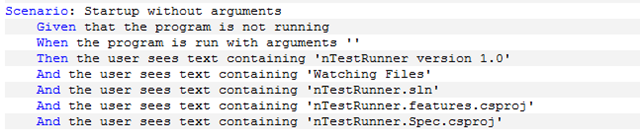
In my previous post I showed the feature and step definition files for a home project I was working on, the first start up scenario looked like this

image

the first and second asserts can be easily done with simple one liners, but from the third third line onwards requires that I read a solution file, and discover what projects are there and print out the names to the console, which is a bit more code than a single line of code, so at this point I dropped down to machine specifications.

I created a test solution file that I could use to within the tests this allowed me to control the paths to projects and other data, this solution file was added to the test project and set to always copy to the output directory during a build. It is always good to control the data coming into an application during testing as it ensures that noting external to the test can effect the results.

  1. [Subject("Solution File")]
  2. public class when_the_solution_file_is_loaded
  3. {
  4.     Establish context =
  5.         () =>
  6.         {
  7.             string currentDirectory = Directory.GetCurrentDirectory();
  8.             _solutionPath = Path.Combine(currentDirectory, "TestSolution.sln");
  9.  
  10.             _solution = new Solution();
  11.         };
  12.  
  13.     Because of =
  14.         () =>
  15.         {
  16.             _solution.Load(_solutionPath);
  17.         };
  18.  
  19.     It contains_the_name_of_the_solution =
  20.         () => _solution.Name.ShouldEqual("TestSolution.sln");
  21.  
  22.  
  23.     static Solution _solution;
  24.     static string _solutionPath;
  25. }


The above test creates a file path to this solution file, then loads the file and ensures that the solution name is set, I decided to create a solution object that would read the solution file and extract the required data using simple regular expressions, because the solution file is not actually valid xml, and cannot be easily parsed in another way.

After getting this simple test to pass, I continued in the same vain to extract the project file paths and names which are then passed back up to the main application for display making the scenario pass completely.

  1. It contains_two_project_files =
  2.     () => _solution.Projects.Count().ShouldEqual(2);
  3.  
  4. It first_project_file_is_TestProject1 =
  5.     () => (from p in _solution.Projects where p.ProjectPath == "TestProject1.csproj" select p).FirstOrDefault().ShouldNotBeNull();
  6.  
  7. It second_project_file_is_TestProject2 =
  8.     () => (from p in _solution.Projects where p.ProjectPath == "TestProject2.csproj" select p).FirstOrDefault().ShouldNotBeNull();
  9.  
  10. It first_project_file_name_is_TestProject1 =
  11.     () => (from p in _solution.Projects where p.ProjectName == "TestProject1.csproj" select p).FirstOrDefault().ShouldNotBeNull();
  12.  
  13. It second_project_file_name_is_TestProject2 =
  14.     () => (from p in _solution.Projects where p.ProjectName == "TestProject2.csproj" select p).FirstOrDefault().ShouldNotBeNull();


Having the feature file and its scenarios guides the generation of the lower level machine specifications, making the tests easier to write because at the time of writing you are attempting to solve a known problem, also the nature of the testing has changed, now only worrying about the output from a function or property rather than how that outcome is achieved, allows the internal structure of a class to be refactored without breaking the tests.

Using this outside in method of development achieves a higher test coverage of the code, with fewer tests, because the features provide the over all frame for the development process, leaving the machine specifications to perform a supporting role where details are necessary.

Knowing when to drop down to the lower level is important, I have formed a simple guideline that I follow

if I can’t make the scenario pass with a single line of code, either directly or by calling an already existing method, then I will drop down to the machine specifications.

Which ensures that I don’t go off writing production code without the assistance of the testing framework.

Posted in Uncategorized | Leave a comment

Spec Flow and Friends 2

Ok so I said I was going to cover Machine Specifications this week but I thought a look at some spec flow tests in the wild so to speak might be helpful, and it gives me a chance to showcase a home project.

A long time ago now I wrote a small application that watched C’# solutions, when a save was made, the application built the solution and ran all the tests, and displayed the result in a popup window.  I have used this on many projects now, but have started to find problems with the way it operates, and decided to do a project rewrite, as the original was all legacy code, and I wanted to provide better support for the application.

I put together two features that covered the basic functionality I wanted,

  1. Feature: nTestRunner solution change
  2.     As a developer
  3.     In order to get rapid feedback
  4.     When I save a file, the program should be compiled and
  5.     all tests run and the results stored in a file in the
  6.     same format as nunit, so I can use beacons to view the
  7.     results of the test.
  8.  
  9.     The file watcher watches the solution file, and the immediate
  10.     project directories, when a change in these watched areas is
  11.     detected then the watcher is stopped, the build and test cycle
  12.     started, and the results written to the xml results file in nunit
  13.     format, if the runner display is set then it is activated with
  14.     the results from the build test cycle.
  15.     
  16. Scenario: with default configuration
  17.     Given the program is running with no argument
  18.     When a change event is received from the watcher
  19.     Then the watcher is switched off
  20.     And the build is triggered
  21.     And the tests are run
  22.     And the results are stored
  23.     And the watcher is restarted
  24.  
  25. Scenario: with test runner configuration set
  26.     Given the program is running with MSpec argument
  27.     When a change event is received from the watcher
  28.     Then only projects with the specified runner are tested
  29.  
  30. Scenario: with the display runner configuration set
  31.     Given the program is running with Growl argument
  32.     When a change event is received from the watcher
  33.     Then the runner display is called
  34.     And the runner display is given the test results


I have laid out the feature files in the same manor, this is my documentation, so there is a large amount of text, that is pure description, then we get to the scenarios, these the above file has been tweaked so that the each is scenario uses a similar syntax, this will assist me when I write the step definitions

  1. Feature: nTestRunner Program Startup
  2.     As a developer
  3.     In order to get rapid feedback
  4.     When I save a file, the program should be compiled and
  5.     all tests run and the results stored in a file in the
  6.     same format as nunit, so I can use beacons to view the
  7.     results of the test.
  8.  
  9.     This feature covers the startup of the program,
  10.     calling nTestRunner
  11.         starts the program up in default mode, it will scan
  12.         up the directory chain looking for a solution file,
  13.         starting at its current directory it is this file
  14.         that the applicaion uses to decide what is a test
  15.         project, and it is the file that is passed to msbuild,
  16.         it is assumed that all test files in the solution want
  17.         to be run, regredless of the test runner used, all
  18.         results are combined into an nunit result format.  
  19.         No display is made when the tests are run, only the file
  20.         is written to the same directory as the found solution file.
  21.         
  22.     calling nTestRunner -Path | -P [path to solution file]
  23.         starts the program up with the solution file path set
  24.  
  25.     calling nTestRunner -Test | -T [Test runner name]
  26.         starts the program up with only the specified test runner
  27.  
  28.     calling nTestRunner -Display | -D [Runner Display Name]
  29.         starts the program up with the specified display runner
  30.  
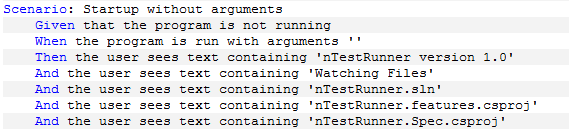
  31. Scenario: Startup without arguments
  32.     Given that the program is not running
  33.     When the program is run with arguments ''
  34.     Then the user sees text containing 'nTestRunner version 1.0'
  35.     And the user sees text containing 'Watching Files'
  36.     And the user sees text containing 'nTestRunner.sln'
  37.     And the user sees text containing 'nTestRunner.features.csproj'
  38.     And the user sees text containing 'nTestRunner.Spec.csproj'
  39.  
  40. Scenario: Startup with path arguments
  41.     Given that the program is not running
  42.     When the program is run with arguments '-Path,C:\TestSolution.sln'
  43.     Then the user sees text containing 'TestSolution.sln'
  44.     And the user sees text containing 'TestProject1.csproj'
  45.     And the user sees text containing 'TestProject2.csproj'
  46.  
  47. Scenario: Startup with test runner arguments
  48.     Given that the program is not running
  49.     When the program is run with arguments '-Test,MSpec'
  50.     Then the user sees text containing 'Running tests with MSpec'
  51.     
  52. Scenario: Startup with display arguments
  53.     Given that the program is not running
  54.     When the program is run with arguments '-Display,Growl'
  55.     Then the user sees text containing 'Displaying results in Growl'

This second file has not undergone any changes as yet, and is still in the raw form from the initial project outline, although it should not take much tweaking to get it into shape.

With the feature files in place, I get an overview of the project, and what I need to do to make everything work, I tend to only worry at this point about exceptions but to focus on the “happy path”, because that is what the user will care about, getting the happy path in the features, will ensure the application works, and give the user the quickest feedback and allows them to answer the question.

Does what I have asked for make sense?

Next step is to choose a feature to start on, in this case it was easy, I need the start-up features before I can even think about anything else, the step definitions are actually very simple consisting of just 3 steps

  1. [Binding]
  2. public class StartupStepDefinations
  3. {
  4.     TestConsole _console;
  5.     Runner _runner;
  6.  
  7.     [Given(@"that the program is not running")]
  8.     public void GivenThatTheProgramIsNotRunning()
  9.     {
  10.         _runner = null;
  11.     }
  12.  
  13.     [When(@"the program is run with arguments '(.*)'")]
  14.     public void WhenTheProgramIsRunWith(string arguments)
  15.     {
  16.         var args = arguments.Split(',');
  17.  
  18.         _console = new TestConsole();
  19.  
  20.         _runner = new Runner(args, _console);
  21.     }
  22.  
  23.     [Then(@"the user sees text containing '(.*)'")]
  24.     public void ThenTheUserSeesTextContaining(string expectedText)
  25.     {
  26.         Assert.Contains(expectedText, _console.Output);
  27.     }
  28. }


and that’s it, the only interesting item in the list is the “WhenTheProgramIsRunWith” step, as this splits the argument string at the comma to produce the argument array that is usually passed into a console application.

The test console is simply a class that has tales the place of the normal standard out for this application, the actual implementation will simply call console.write with any string given to it, this version however aggregates the strings sent to it which it returns when the output property is called.

I will next time cover machine specifications, and show how I judge when to move from this high level whole system tests to the lower level specification tests.

Posted in Uncategorized | 3 Comments

Spec Flow and Friends

I started to write a blog post about how I currently go about writing software and what Behaviour Driven Development (BDD) is to me, I got virtually to the end of the first draft, when it occurred to me that I was describing the use of tooling but had not described what the tools actually were! hence this post.

In addition to Visual Studio I am currently using:

    • 1.  Resharper which I have gone on about at some length at various times.
    • 2.  SpecFlow a plain text business readable specification test framework, and the subject of this post 
    • 3.  Machine Specifications a context unit specification framework, which I will cover next time.

SpecFlow

Based on the ruby framework Cucumber, SpecFlow takes a plain text feature document with a simple syntax and creates executable specifications for either the MSTest or the NUnit test runners. 

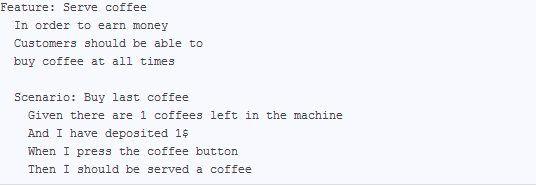
A feature file is almost the same as a user story within the agile context, a feature has a simple text description, and a number of structured scenarios each containing a number of steps that describe the setup execution and expected results in a ubiquitous language of the application, for example

Feature: Addition
    In order to avoid silly mistakes
    As a math idiot
    I want to be told the sum of two numbers

Scenario: Add two numbers
    Given I have entered 50 into the calculator
    And I have entered 70 into the calculator
    When I press add
    Then the result should be 120 on the screen


The only words required by SpecFlow in this whole feature are the ones in blue, everything else is up to the user, this allows for very specific business domain language to be used and because of the terseness of the required syntax, there is also support for other languages not only English. 

Looking at each of the SpecFlow syntax items in turn.

Feature:

the title of the feature is an important component of the system, this will directly translate into the class name of the generated test, so feature titles must be unique, the remainder of the feature text (after the carriage return) can be styled like the above example using the Connextra format

In order to [benefit]

As a [stakeholder]

I want to [feature]

or simply as a paragraph or more of description, or any other format the user wants to use, after this narrative comes one or more Scenarios which are the heart of the spec flow system.

Scenario:

There can be one or more scenarios for a given feature, these describe how the user interacts with a specific feature using a structured syntax

Given sets up the context for the scenario

When is the action that will create the result

Then asserts that the results created by the action are correct

The And keyword can be used in conjunction with any of the three scenario steps to extend them in a language friendly fashion.

The next stage of the process is to create the step definitions which link our text feature file to the production code.  A step definition is simply a class with the binding attribute and a method with the given, when or then attribute attached.  The method attribute is the binding that links the method to a step in a feature file.

  1. [Binding]
  2. public class StepDefinitions
  3. {
  4.     [Given(@"I have entered 50 into the calculator")]
  5.     public void GivenIHaveEntered50IntoTheCalculator()
  6.     {
  7.         ScenarioContext.Current.Pending();
  8.     }
  9.  
  10.     [Given(@"I have entered 70 into the calculator")]
  11.     public void GivenIHaveEntered70IntoTheCalculator()
  12.     {
  13.         ScenarioContext.Current.Pending();
  14.     }
  15.  
  16.     [When(@"I press add")]
  17.     public void WhenIPressAdd()
  18.     {
  19.         ScenarioContext.Current.Pending();
  20.     }
  21.  
  22.     [Then(@"the result should be 120 on the screen")]
  23.     public void ThenTheResultShouldBe120OnTheScreen()
  24.     {
  25.         ScenarioContext.Current.Pending();
  26.     }
  27. }


I actually copied these definitions from the NUnit text output window, when the specifications are run without definitions, the test runner outputs example steps for the developer to copy. Notice how the “And” has now become a “Given”, the ‘And’ keyword becomes the parent ‘Given’, ‘When’ or ‘Then’, depending on where it is used.  The text written in the scenario becomes the attribute value within the step definition  

Having a single step definition  for each step of the scenario is wasteful, making maintenance difficult and doesn’t comply with the DRY principle, the attribute text of the two ‘Given’ methods are nearly the same, the only difference is the entered values, we can combine these two steps into a single code step using a simple regular expression.

  1. [Given(@"I have entered (.*) into the calculator")]
  2. public void GivenIHaveEntered(int enteredValue)
  3. {
  4.     ScenarioContext.Current.Pending();
  5. }


this single given step now works for both the ‘Given’ and the ‘And’ steps in the scenario, the text in the feature is automatically converted in to an ‘int’ for us, ready for the for use within the code.

I can do the same with the ‘Then’ step, so that I can read the expected result.

  1. [Then(@"the result should be (.*) on the screen")]
  2. public void ThenTheResultShouldBe(int expectedResult)
  3. {
  4.     ScenarioContext.Current.Pending();
  5. }


At this point NUnit reports one inconclusive test and no missing step definitions and I am ready to start coding. 

Before I continue though I want to share some guidelines I have developed over time with regard to writing the feature text, and scenarios.

Getting the feature text right, before writing any step definitions is well worth the effort, it is a lot easier to edit the text before the step definitions are written, rather than trying to edit both sets of files later.

1. I use the narrative section of the feature file to describe the application and what this particular feature file is going to cover, all very high level and non technical,  this will be my application documentation in the future so I want it to be expressive and clear as to what each feature covers.

2. I get all the feature files written even if only in draft form, before writing any step definitions. these features define the application, and having the overall view helps guide the development process, helps remove duplication and can help guide the creation of the step definitions.

3. Once I have the feature text complete, I look at the sentence structure to see if there are places I can make them generic, I am thinking about the step definition process at this point, I want to reduce the number of steps to as few as possible, whilst maintaining the scenario uniqueness’s, if you have more than one feature file complete I try to look across features to reduce the step definition count.

Keeping the step definition count to as low as possible makes maintenance easier, because these tests cover a large part of the application they can become complex very easily, this must be managed, so that future maintenance is as easy as possible, I use the normal clean code practices to keeping methods small, with a single responsibility.

Coding the steps is now fairly easy, we only write the test code at this point, and only just enough production code to enable the application to compile.

  1. [Binding]
  2. public class StepDefinitions
  3. {
  4.     Calculator _calculator;
  5.     int _result;
  6.  
  7.     [BeforeScenario()]
  8.     public void setup()
  9.     {
  10.         _calculator = new Calculator();
  11.     }
  12.  
  13.     [Given(@"I have entered (.*) into the calculator")]
  14.     public void GivenIHaveEntered(int enteredValue)
  15.     {
  16.         _calculator.Number(enteredValue);
  17.     }
  18.     
  19.     [When(@"I press add")]
  20.     public void WhenIPressAdd()
  21.     {
  22.         _result = _calculator.Add();
  23.     }
  24.  
  25.     [Then(@"the result should be (.*) on the screen")]
  26.     public void ThenTheResultShouldBe(int expectedResult)
  27.     {
  28.         Assert.AreEqual(expectedResult, _result);
  29.     }
  30. }
  31.  
  32. public class Calculator
  33. {
  34.     public void Number(int enteredValue)
  35.     {
  36.         throw new NotImplementedException();
  37.     }
  38.  
  39.     public int Add()
  40.     {
  41.         throw new NotImplementedException();
  42.     }
  43. }


Notice how at this point my production code is actually in the test code base, I can move it easily later using Resharpers Move_to command. Another thing to notice is that I use field variables to store state between the various scenario steps, SpecFlow does contain a context bag which you can use to store state, I just prefer at the moment to use something I can control.

This test of cause actually fails at the moment with a not implemented exception which is what I expect. Now I have some choices,

If the code required to make the test is going to be complex then I will drop down into Machine Specifications, using the scenario as my requirement guide, and write TDD style tests to drive the required functionality, more of that in the next post!

But as in this case the code required is simple to implement or is simply calling other methods on already written classes, (A typical case for web page code) then I will simply write that code here, make the feature pass, and then move the passing production code up to the production project. 

In some cases it may be a combination of the two processes that complete the whole feature, the idea is to use the best tooling to get the job done,

  1. public class Calculator
  2. {
  3.     readonly IList<int> numbers = new List<int>();
  4.  
  5.     public void Number(int enteredValue)
  6.     {
  7.         numbers.Add(enteredValue);
  8.     }
  9.  
  10.     public int Add()
  11.     {
  12.         return numbers.Sum();
  13.     }
  14. }

Because SpecFlow has such a light touch, and can be made so expressive, it is worth writing a simple feature file for most projects, using the feature to focus the mind on the problem at hand, which  makes the final code easier to write, and the feature file can act as the documentation for the project.

Next time a quick overview of Machine Specifications,

Posted in Uncategorized | 1 Comment

Choosing a Chair

Two chairs, both functional and provide exactly the same service.

Solid Chair  Folding Chair

But which is better?

Having a context helps to make the decision on which chair to take, a quick sit down, or a long lunch, the one on the left will properly be around longer, so will be used more over its lifespan, but is it better?

When it comes to code, developers have the same problem, except it in some ways its worse! How many times has a developer quickly put together an application that will only be used “once”, only then to have it come into continuous use, bugs and all, for months or even years!  Having built a folding chair, but having to support it into the future adding padding when the user complains about it being uncomfortable.

Attempting to build the quick application that can morph into a core service with a bit of refactoring is the holy grail of modern software development, where rapid application development has pushed the art of software to its limits.

Practices spawning from this grail search are what developers argue about, how productive will a developer be if they  follow pattern “a” or “b” instead of pattern “c”, which pattern produces code that is better, more readable and reliable, which pattern allows the developer to produce the application within the time available? 

There is always someone with a better way, or another framework that will make it easier, solve the problem etc.  Inevitability all the ideas and frameworks fall short at some point, there is a situation where it will be impossible to use framework “z” or practice “y”, but it is these choices that make the developers craft interesting, there are very few wrong answers to these problems, but there are many opinions.

The latest controversy around the programming internet has been about the craftsmanship label,  “Michael Feathers”, “Dan North”“Gil Zilberfeld”, “Jason Gorman” and finally “Rob Martin”, have blogged extensively about it. 

Craftsmanship for me is knowing how to build a folding chair, that can be turned into a Chippendale masterpiece, and knowing when to build each from scratch, In code terms this means I must try to write the cleanest code I can, every time regardless of the project. 

This is not gold plating the code, ivory tower or elitist thinking and everything has to fit into the time scale allowed for the project.  But it has been proven time and again that the cleaner the code is the quicker the development process can run, up to a point:

                1. “It is not possible to go slower because the code is too good”

                2. “It is possible to take too much time making the code good.”

Ron Jeffries

But again that’s the craftsmanship, in knowing where to stop cleaning, these things can be learnt, and its through practicing the art of programming, reading code and and following the tenants of something like the craftsmanship movement that a developer can improve their skills.

What is interesting is not what the “movement” is called, but the practices that emerge, because when the dust has settled, it is the practices that will guide the way we write code in the future. 

A lot of the things we take for granted today were, at one time as controversial as the idea of “test first development” is today: 

The removal of the “goto” from programming languages, was in its day fought against by many developers, who felt it was going to stop them from developing their applications in the way they wanted, but today some languages don’t even have the concept of the “goto”, and few if any developers would actually use the “goto” command day to day. 

The idea of object oriented design, is today taken for granted, but in its time was again the source of many arguments, and so it will probably be for the craftsmanship principles, until they become part of the mainstream culture.

The idea of writing well structured code that follows the “SOLID” principles guided by tests written first for me make perfect sense.  Has writing the test first changed the way I program? Yes definitely, but its not the tests that have forced that change, its what the tests have shown me, and the things I have learnt that have changed the way I program.  The tests have not forced change, but they have facilitated it.

Posted in Uncategorized | Leave a comment

Stuck in the Loop

In my last post I talked about quality, and how that as developers we are responsible for at least two levels of quality, the first being that seen by the user, and the second being the quality of the code that is written and how the second quality can effect the rate of future development.

I hinted that we spend a lot of our time not actually programming, but doing a lot of associated tasks, most of which appeared to be to do with debugging!  realising that the programming loop can involve quite a bit of stepping though code, brings us to the conclusion, that the only way to speed this loop up is increate the quality of the code, better code will involve less debugging!

When we write code, we introduce bugs, event the smallest change can have unforeseen consequence, this is a ‘fact’ of life within software development, by stepping through our code we are trying to mitigate any errors we have made. Wouldn’t it be nice if we could find a way to add code to a system, and know that the changes we have added have not broken some far corner of forgotten code.

This desire to be able to check the code that is written lead to the introduction of TDD “Test Driven Development”, which hit the mainstream about around 2003-4, although there have not been many studies done, it is generally accepted that writing tests for code improves the quality of the code speeding the development process over the lifetime of a project.  TDD changes the development loop from

      1: Write code

      2: Run Code, stepping through code

into a three step process

        1: “Red” write a failing test

        2: “Green” write enough production code to make the test pass

        3: “Refactor” both the production code and the test code.

Many developers had/have great trouble with the whole test first paradigm, not necessary with the idea of writing tests, but writing them before writing production code. Deciding what to to test can be extremely difficult if not impossible at first and this position is totally understandable, and very difficult to answer, because the reason to write the test first has nothing to do with the actual test itself. 

Writing the test first changes the way the production code is written, one part of the magic of test first development in any of its forms is that the resulting production code on the whole tends to have a much better structure.  Its almost as if writing the test first, makes the production code confirm to the “SOLID” principles by default, its not always the case, but well structured code, is also code that is easy to test.  So writing the test first makes by definition the code easy to test and probably well structured!

The first problem I faced when learning test first development was “what test to write?”  Actually getting the whole “Red/Green/Refactor” cycle going, can be like pushing a car so to get the wheels turning I used to write a test called “Hook”

  1. public void Hook()
  2. {
  3.     Assert.IsTrue(false);
  4. }


Which when run in the test runner would fail, changing the false to true would make it pass, this confirmed that the test runner etc was working correctly and had picked up my class containing the tests, and it gave me thinking room, getting the first test out of the way seamed to get the car rolling, and made the second test easier to write.  But to be honest this is not ideal.

I had a problem. While using and teaching agile practices like test-driven development (TDD) on projects in different environments, I kept coming across the same confusion and misunderstandings. Programmers wanted to know where to start, what to test and what not to test, how much to test in one go, what to call their tests, and how to understand why a test fails.”

Dan North

So I wasn’t the only one having problems, the solution outlined by Dan North was to change the language, to stop talking about tests, and to start to discuss specifications this became known as BDD “Behaviour Driven Development”, Changing the terminology used, but keeping the idea of writing a failing specification first, freed developers from the idea of tests, specifications define what a function is going to do and the expected result. for developers talking in specifications and behaviours is natural which makes it easier to write in code for the specification

So instead of

  1. [TestMethod]
  2. public void Constructor_NullPram_ThrowsArgumentNullException()
  3. {
  4.     Exception lastException = null;
  5.     try
  6.     {
  7.         var shipment = new Shipment(null);
  8.     }
  9.     catch (Exception ex)
  10.     {
  11.         lastException = ex;
  12.     }
  13.  
  14.     Assert.IsInstanceOfType(lastException, typeof (ArgumentNullException));
  15. }


the specification  can be written as a sentence

  1. [TestMethod]
  2. public void A_shipment_cannot_be_created_without_an_address()
  3. {
  4.     Exception lastException = null;
  5.     try
  6.     {
  7.         var shipment = new Shipment(null);
  8.     }
  9.     catch (Exception ex)
  10.     {
  11.         lastException = ex;
  12.     }
  13.  
  14.     Assert.IsInstanceOfType(lastException, typeof (ArgumentNullException));
  15. }


The change may not be that obvious at first here, but changing what the test is called changes the way the developer thinks about the test, it also changes the output from the test runner.

image

This idea of specifications lead to new test frameworks being developed that totally removed the word “test” from the vocabulary, and concentrated on building better sentence structure in the output, and defining a better structure within the code.  Having a formal layout where each stage of the specification is split using an Arrange/Act/Assert format, made it easier for developers to write the specification code.

  1. [Subject("Shipment")]
  2. public class Constructing_a_shipment
  3. {
  4.     Establish context =
  5.         () =>
  6.             {
  7.                 _emptyAddress = null;
  8.             };
  9.  
  10.     Because of =
  11.         () =>
  12.             {
  13.                 _result = Catch.Exception(() => new Shipment(_emptyAddress));
  14.             };
  15.  
  16.     It cannot_be_created_without_a_recipient_address =
  17.         () => _result.ShouldBeOfType<ArgumentNullException>();
  18.  
  19.     static Exception _result;
  20.     static Address _emptyAddress;
  21. }


Ignoring the funky “=() =>” syntax for the minute which is needed by the c# compiler, the above code does exactly the same test as the original one above except in a more structured fashion.

“Establish context” sets the context for the test (Arrange), in this case an empty address variable,

“Because of” is the action that makes this specification work (Act), in this case we are catching an exception raised by the creation of a shipment without a valid address

“it” checks that the result of the action (Assert) in this case ensuring that the correct type of exception is raised.

The output from running this specification is totally different, building a document like specification.

image

In theory given only the output from a specification run, the production and specification code could be recreated! The output has become the specification for the application.

By moving away from talking about tests, to talking about specifications, writing the “test” first has become easier, new frameworks have helped move the code and output towards a more sentence like structure, which in turn make it easier for developers to specify what the code should do.

This movement to a more sentence like structure has resulted in a change at the other end of the testing spectrum as well.  Taking a 10,000 foot view of the whole application at the acceptance test level new frameworks allow the development of feature specifications that are written in a plan text format using a standard notation.

image

This new notation is called “Gherkin” and was originally developed with the ruby language test runner “Cucumber” in mind, but is now used in other frameworks, including the dot-net framework  “Spec-Flow”

This plain text specification is combined with a step definition code file to produce executable specifications, and because the plain text is separated from the developer step definition code, in theory the specification documents can be created first before being handed onto the developer as the actual feature requirement.

This has lead to a new style of development outlined in the “RSpec Book” called “Outside In Development”.  Where the high level features are defined as plain text, twinned with a code definition file, to produce executable features, which the developer uses to drive the lower level specifications, which in turn drive the production code.  Outside in development suits the agile (SCRUM) development cycle because it is totally feature based, which has made it to be popular among the agile software development houses.

Using Outside in development and Behaviour Driven Design specifications, has made it easier to achieve test first development, the structure of the features and specifications make it easier to find and amend code in the future, along with providing up to date specification documentation, through the test runners output.

Having all these specifications at different levels of the application, allow a high level of confidence that any changes made to the application, will have a minimal impact and allow for other agile techniques such as “Continuous Integration”, and Automatic Deployment.

Posted in Uncategorized | Leave a comment

Quality

Quality, for software developers comes in two flavours, there is the external quality, this is what the user of our software sees, and has to deal with, the features that are implemented the usability of the application, its what QA attacks with gusto 😉

This quality can be  manipulated to improve production, adding or removing features, deciding the minimal marketable feature set, this is the way a project is guided to delivery, traditionally!

But there is another quality that will scupper all attempts to meet deadlines, kill the creativity of the developers and make changes to the application slow and error prone, and that’s the internal quality.  A quality that is hardly, if ever measured, I am talking about the source code quality.

I have not found a good definition of good source code, although I do like this Ward Cunningham quote:

“Each routine you read turns out to be pretty much what you expected.  You can call it beautiful code when the code also makes it look like the language was made for the problem.”

But in truth if you were to ask three developers what they think makes up high quality code, you will probably get at least five different versions! but any seasoned developer knows when its absent, the code is difficult to read and understand, changes are difficult to make, because they have unintended consequences in unrelated modules, we have all seen it, we have all written it. 

But before I go on lets just dispel one programming myth, we don’t spend all day programming!


Typing is not the bottleneck.


We spend a small amount of time actually writing code, the remainder of our time is spent trying to solve problems created by the code we have written (debugging), helping other developers solve problems with the code we have written (debugging), waiting for debuggers to run, setting breakpoints and stepping thought code that works, trying to find the bit that doesn’t (debugging) and trying to think of solutions to the problems we are trying to solve (thinking). 

The actual act of typing in the code, or coding is just a small part of our day, and we haven’t added all the time spent reading code that we and other developers have written (debugging?)

cartoon programming

If the code we are working on has a low quality value, its going to take longer for us to understand, make changes and additions, and debug, so the internal quality of the codebase actually directly effects the productivity of the team, getting quicker typists is not going to work! We need to improve the quality of our code.

To improve the quality, we need a way to measure the quality of our code, and to decide what code quality actually means for us, there are a few metrics that have been developed,

“Cyclomatic Complexity” which essentially measures the routes through a method, the minimum is 1 with means there is a single path through a method, an if statement will add one to the index, as  there are now two paths through the method etc, so the lower the number the easier the method should be to understand and change.

“Maintainability”, which is an attempt to rate methods on their maintainability, which is a function of their size and complexity, in visual studio 2008 produces an index between 0 and 100 the higher the number the better the apparent code maintainability.

Additional tooling like ReSharper and Code-Rush provide visual queues of potential problems within the code, and quick shortcuts to fix the problems the programs find.

But all these tools suffer from the same problem, we are getting what the tool thinks is good code, and they are really only looking at small sections of the codebase, so its difficult for tooling to get an overall view of the whole project, they help but won’t provide the whole solution.

The only way that I have found so far to gauge the quality of my code, is to use the above tooling as a guide, but in addition, let others see my code, good, bad or indifferent, because the only time you truly know if you have hit the maintainability sweet spot is when a change needs to be made, or someone else has to read your code, and then very quickly you will find out if there are pain points! 

So don’t be shy with your code, let others see, read and talk about it, because by improving the quality of our codebase we  will improve our productivity, enjoyment and skills as developers.

Posted in Uncategorized | Leave a comment

Vertical Slicing

Probably a really good title for a horror or a rock climbing movie, but sadly its neither, its just my thoughts on the software development process and  how to dice a project into manageable chunks, to get maximum feedback.

When developers start to break a project up, they very naturally slice the project using the tiers of the application as the boundaries, then they work on each tier producing a completed product.

Over the years there have been many arguments over where best to start the development process, either with the UI (top down development), the database (bottom up development) or from the business services (middle out development).  What all of these slicing and dicing  methods have in common is that there is no program until right at the very end of the development cycle within the final rush to production.

This means that the user (the person who wants the application) doesn’t see anything until right before release.  While the project is in the “black hole” of development the user is left with nothing to see, and invariably thinks up new and cunning things that the “application” could do and problems it could solve, which has become know as “feature creep”, and is the bane of every software manager!

In 1970 Dr Winston Royce published a paper entitled “Managing the Development of Large Software Systems”, the paper contained many illustrations of how software development could be managed, “completely designed before coded and completely coded before tested”, this image of software development became known as waterfall.  Sadly, simply looking at the pictures and ignoring the text, has lead to the dominance of the waterfall technique.  The text of the paper actually describes an iterative design process where each iteration has design, coding and testing elements within it.  Only now some 40 years later is this style of development becoming popular.

The trouble is waterfall is very attractive to developers, simply look at the first paragraph, we tend to split projects in a way that dictates waterfall, there may not be the huge planning up front, but development still takes place in a black hole, where nothing escapes until the final rush of release   Whereupon the bug, debug cycle starts as the user tries to mould the application into the thing they now realise they wanted.

rvlvngdr1

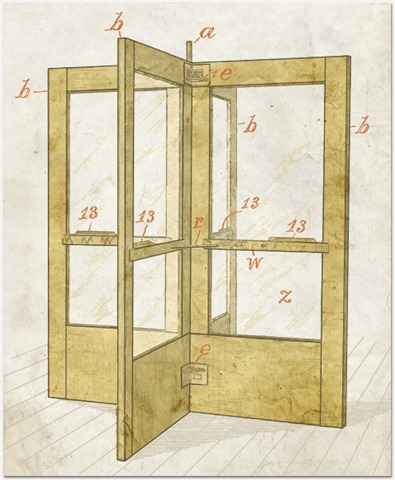
Instead of a black hole, we need a revolving door, where software flows out, is viewed by the user, and flows back to the developers with notes and changes, a continuous stream of questions “is this what you want?” being asked by the developers in the code and partially completed application, and answers returning from the user “yes but like this” as change requests, and new features.  Eventually a stage is reached where the user is happy and the software is released, this does not have to stop the flow of the conversation, changes can still be requested, and the application evolved, it is mealy that the application has enough functionality to be useful.

Change is no longer seen as the green eyed demon, that must be chained, and controlled, change is now the assistant is should be, guiding the application through to completion.  The user moves from being the annoying person over the wall causing problems, to an integral part of the development process, a touchstone, for the application.

The iterative methodologies of SCRUM and LEAN extol the practice of quick turnarounds and getting feedback, and have iterative development at their core.  But each can be subverted, if the product is not seen by the user before it is completed then is it still iterative? Where is the feedback loop?

To avoid subverting the point of the agile methodologies, the project should be sliced in a way that promotes feedback, and dissuades the practice of waterfall.

One way this can be achieved is to slice the project virtually down through all the application layers from UI to database, providing one clean slice of the application.  The user can view a slice, one at a time as they are completed, each new slice being added to the previous, eventually enough slices are provided that the application is fit for release.  Because each slice is so small it can be easily changed during the development process, these changes help to evolve the application, and because each slice is seen by the user, there is no change, debug cycle at the conclusion of the project.

Deciding what and where to slice is a problem that can be solved during the design process, and requirements gathering stage, having well defined features that slice the application naturally for the developer will promote iterative development and provide a vehicle for user feedback.

The makeup of a feature now becomes important, too big, and feedback won’t be received quick enough to gain the advantages of iterative development, too small and the user wont have enough to give valid feedback on, delaying valuable information getting to the developer.

To be well defined a feature should in my view.

  1. Define a single action that the user takes and the result of that action
  2. The defined action should result in data passing through each tier of the application, or the generation of a new view within the application.
  3. The defined feature should be able to completed within a short period of time.

Because each feature is distinct and contained, development can be started and stopped on a product very easily, at the end of each feature, the next feature can be picked up, or a different product feature selected, in essence each feature becomes a bit like a bug fix, a single piece of functionality is added to the application, and then passed for checking to the user.

This is a radically different way of thinking about software, and requires a lot of practice to get the best from the approach, but the rewards are that the user of the software controls the release cycle, because they know where the project is at each point, and what features provide the minimum requirement for release, for the developer release is simply another iteration out the door

Posted in Project Management | Tagged | Leave a comment